Training, exams & HRDF compliance
Plan. Track. Comply. Grow.
TrainTrack helps organisations manage employee training, track competencies and stay compliant — all in one place. Courses, sessions, attendance, exams and certification expiry, for every company you train.
- HRDF-ready reports
- Exams that grade themselves
- Expiry alerts before it is too late
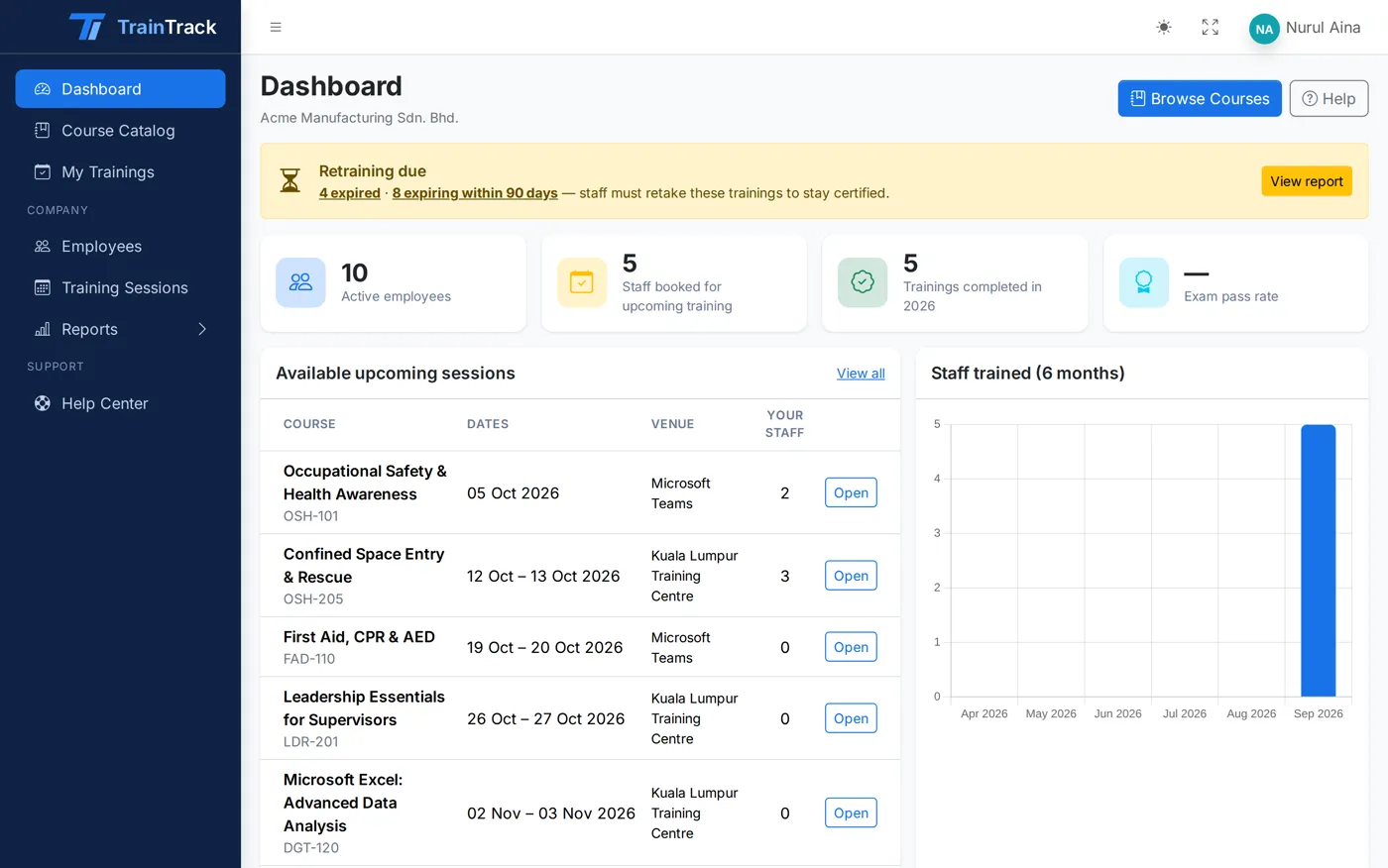
The problem
Training records should not live in five spreadsheets.
Attendance sheets, exam papers, HRDF paperwork and a calendar reminder for every certificate. TrainTrack replaces all of it with one system.
Emailing course lists and collecting names by WhatsApp
A live catalog where HR books their own staff in
Paper attendance sheets scanned for every claim
Daily attendance marked in the app and exported to PDF
Marking exam papers by hand
Timed online exams, graded the moment they are submitted
Finding out a first-aid certificate lapsed during an audit
Expiry tracked for every employee, with alerts 90 days ahead
Chasing trainees with reminders
Enrollment, reminder, exam and expiry emails sent automatically
How it works
One training lifecycle, start to renewal.
Every course in TrainTrack follows the same simple path — and loops back when it is time to recertify.
-
01
Plan
Publish courses with HRDF details and a recertification period.
-
02
Enroll
Schedule sessions. Company HR books their own staff in.
-
03
Train
Mark daily attendance and complete the session.
-
04
Assess
Trainees sit timed exams that grade themselves.
-
05
Renew
Expiry is tracked and HR is told before it is due.
30-second tour
Training today. A stronger tomorrow.
See how TrainTrack takes a company from booking a course to a certified, compliant workforce.
Then try it yourselfEverything included
Every tool you need to run training.
Twelve areas, one system. Nothing extra to buy, nothing to bolt on.
Course catalog
Publish your courses once. Company HR browses them, filters by what HRDF will fund, and books their staff in a few clicks.
6 featuresSessions & enrollment
Run public classes open to every client, or in-house sessions for one company. HR enrolls their own staff; you see the headcount live.
5 featuresAttendance
Mark attendance for every day of a multi-day session — the evidence HRDF claims and client reports depend on.
3 featuresExams & assessments
Build multiple-choice exams, attach them to a course, and let TrainTrack time, mark and record every attempt.
8 featuresCertification expiry
First aid, safety and compliance training must be retaken on time. TrainTrack works out every expiry date and warns HR before it passes.
5 featuresCompanies & employees
Serve many companies from one system. Each company’s HR sees their own staff and nothing else.
4 featuresReports & HRDF evidence
Attendance, exam results and certification expiry — filtered the way you need, and exported the way HRDF and your clients ask for them.
5 featuresAutomatic emails
TrainTrack sends the reminders your team used to send by hand. Switch each one on or off.
6 featuresTrainee portal
Every employee gets a simple portal with their upcoming training, exams to sit and certifications to renew.
3 featuresHelp Center
Short video tutorials and written guides, one click from any page.
3 featuresResellers & marketing kit
Give resellers their own referral code and link, track commission, and hand them ready-made marketing material.
2 featuresRoles & access
The training provider runs the system; each company manages its own people; trainees see their own training.
3 featuresCertification expiry
Never miss a renewal again.
First aid, safety and compliance training must be retaken on time. TrainTrack works out every expiry date and warns HR before it passes.
- Expiry worked out for you Last completion date plus the course’s validity period — for every employee, every course.
- Valid, Expiring, Expired A clear status for each certification. “Expiring” starts 90 days ahead by default, and you can change the window.
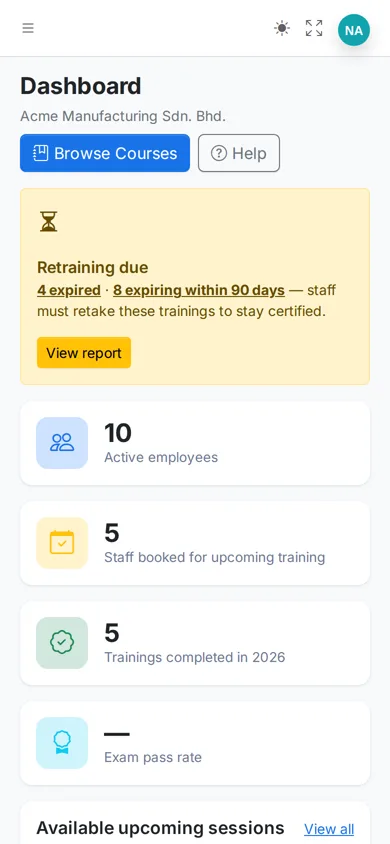
- Retraining due alert The HR dashboard shows how many staff have expired or are about to, with a link straight to the list.
- Book renewal One click from an expiring certification to the next session of the same course.
Ahmad Faizal · EMP-1108
Retraining due — 1 expired, 1 expiring within 90 days
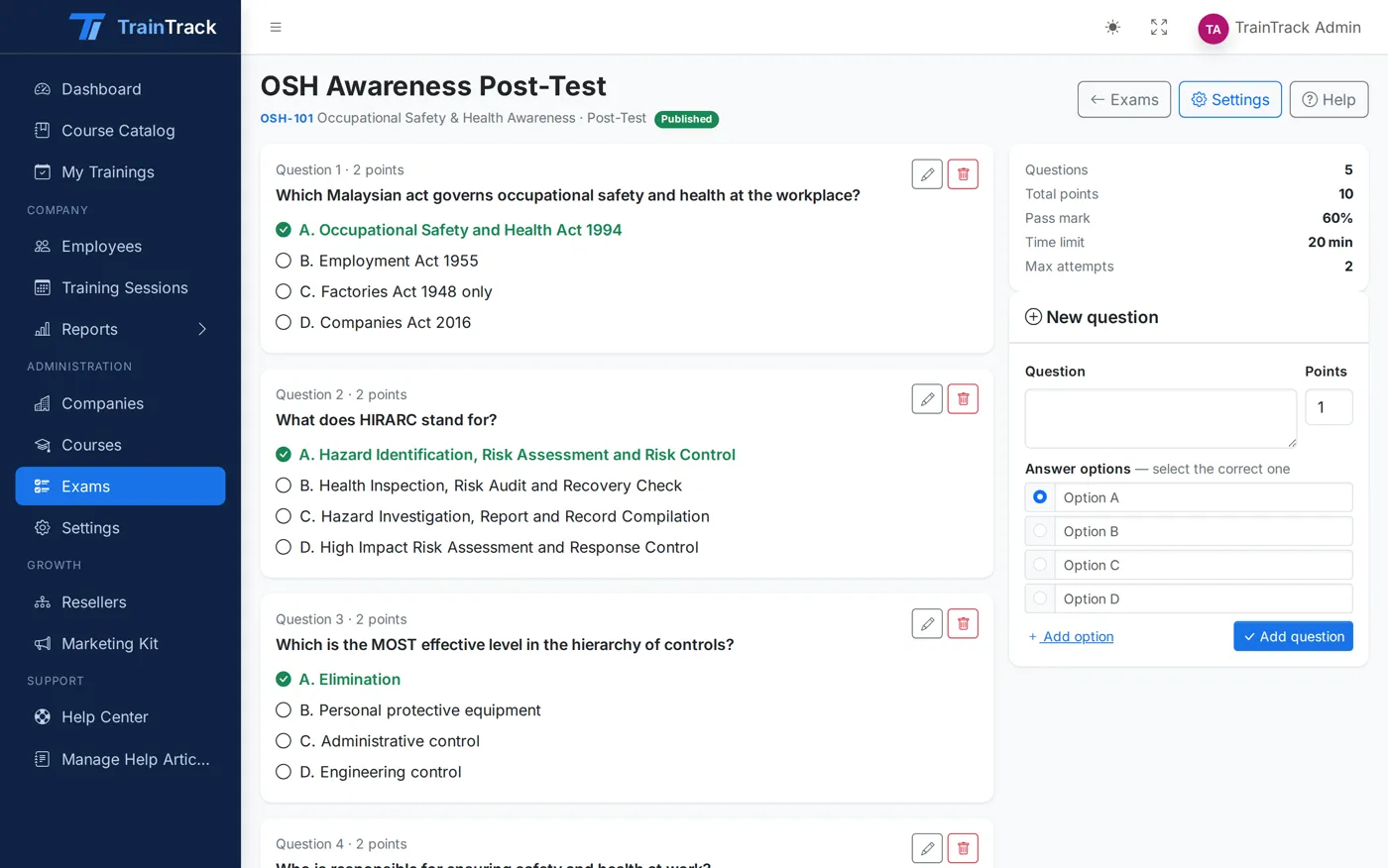
Exams & assessments
Pre-tests, post-tests and assessments — graded for you.
Build multiple-choice exams, attach them to a course, and let TrainTrack time, mark and record every attempt.
- Three exam types Pre-test to measure the starting point, post-test to prove learning, or a standalone assessment.
- Question builder Multiple-choice questions with 2 to 6 options and 1 to 100 points each.
- Pass mark and attempts Set the pass mark from 0 to 100% and allow 1 to 20 attempts.
- Timer and shuffle Time limits from 1 to 600 minutes, with questions in a shuffled order for each attempt.
- Automatic grading Scores are calculated the moment a trainee submits. When time runs out, the exam submits itself.
Reports & HRDF evidence
Claim-ready reports in two clicks.
Attendance, exam results and certification expiry — filtered the way you need, and exported the way HRDF and your clients ask for them.
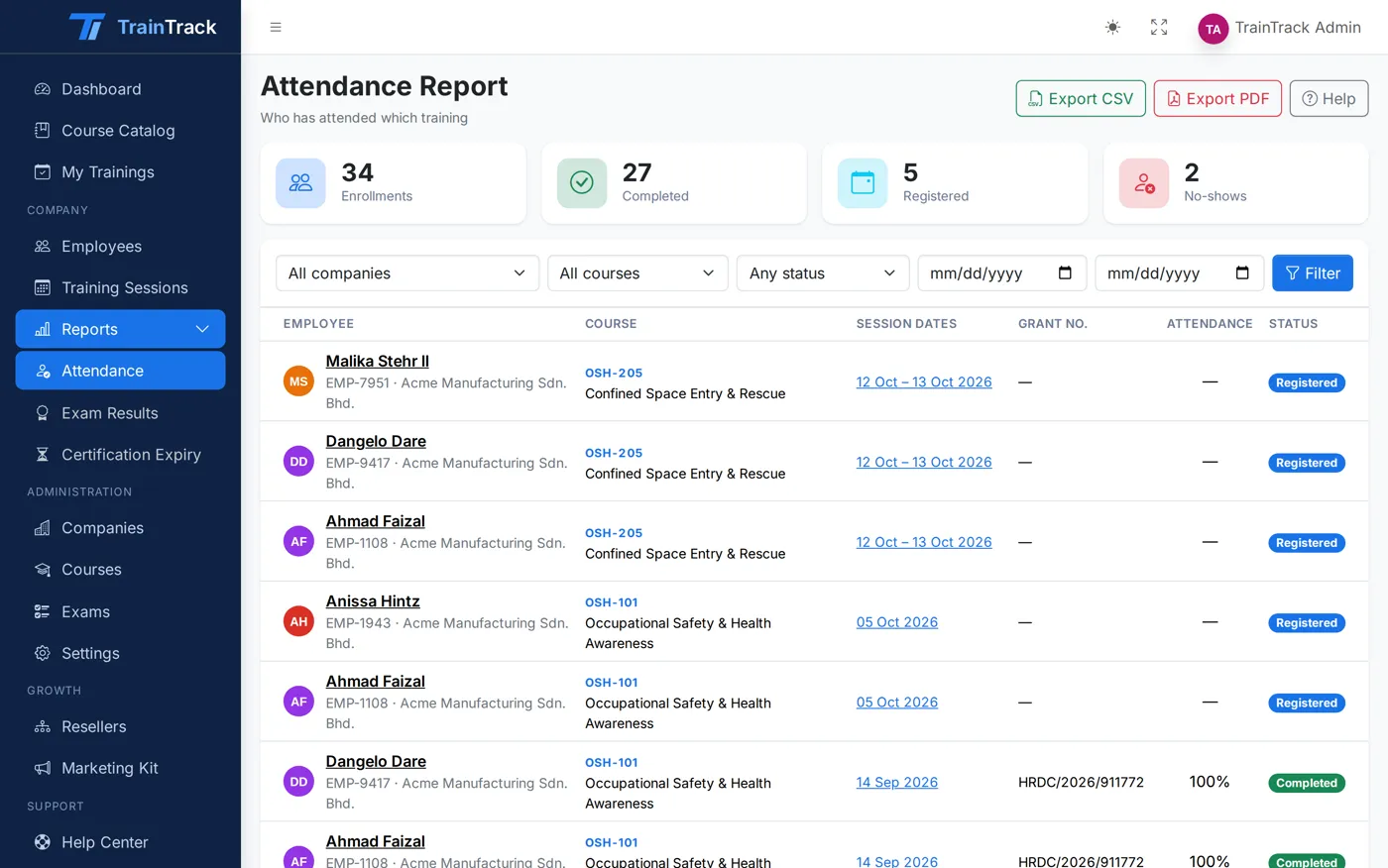
Attendance report
Who attended which session, day by day, with totals per company.
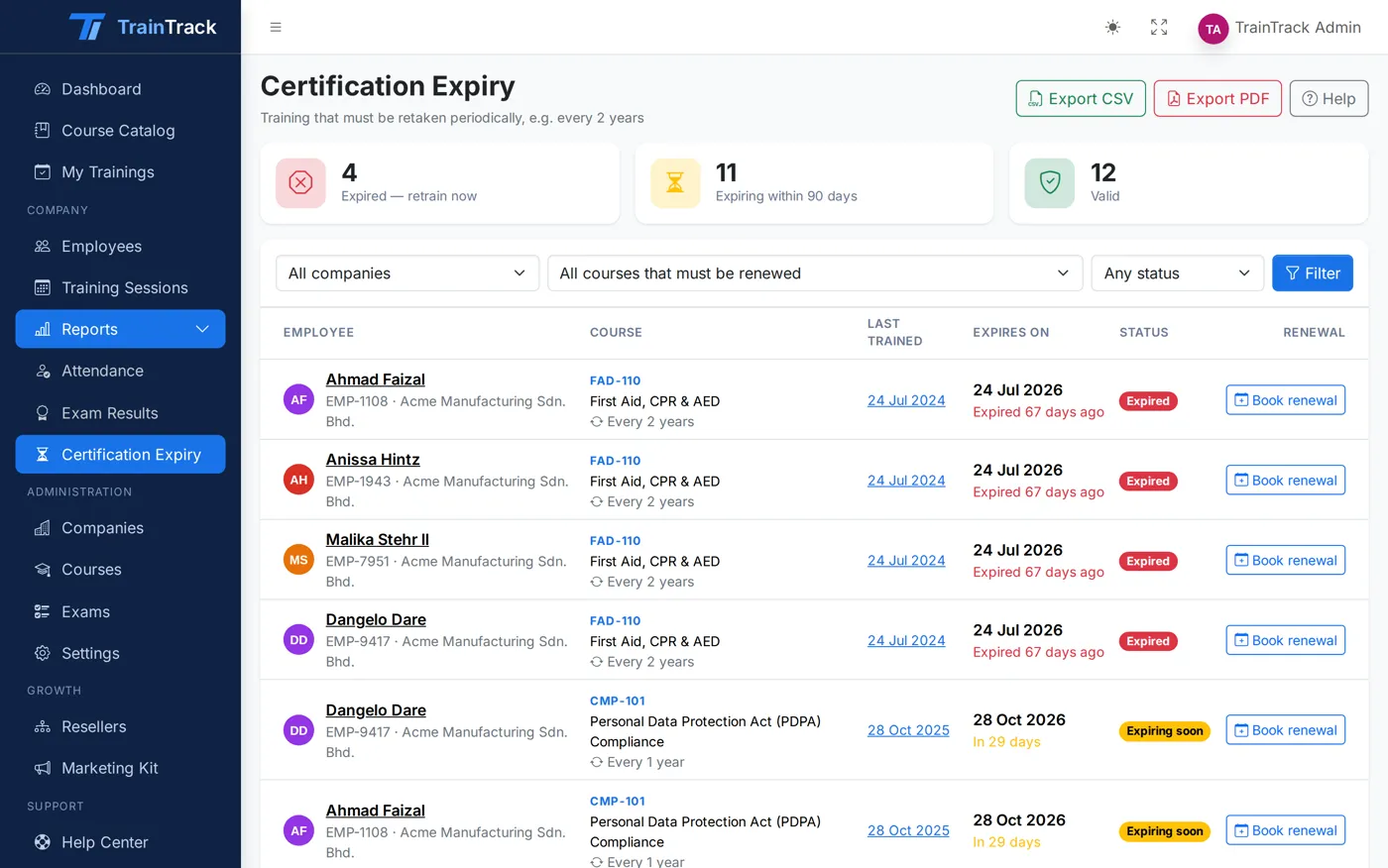
Certification expiry report
Every certification with its last training date, expiry date and status.
Trainee portal
Trainees see what is next — on any phone.
Every employee gets a simple portal with their upcoming training, exams to sit and certifications to renew.
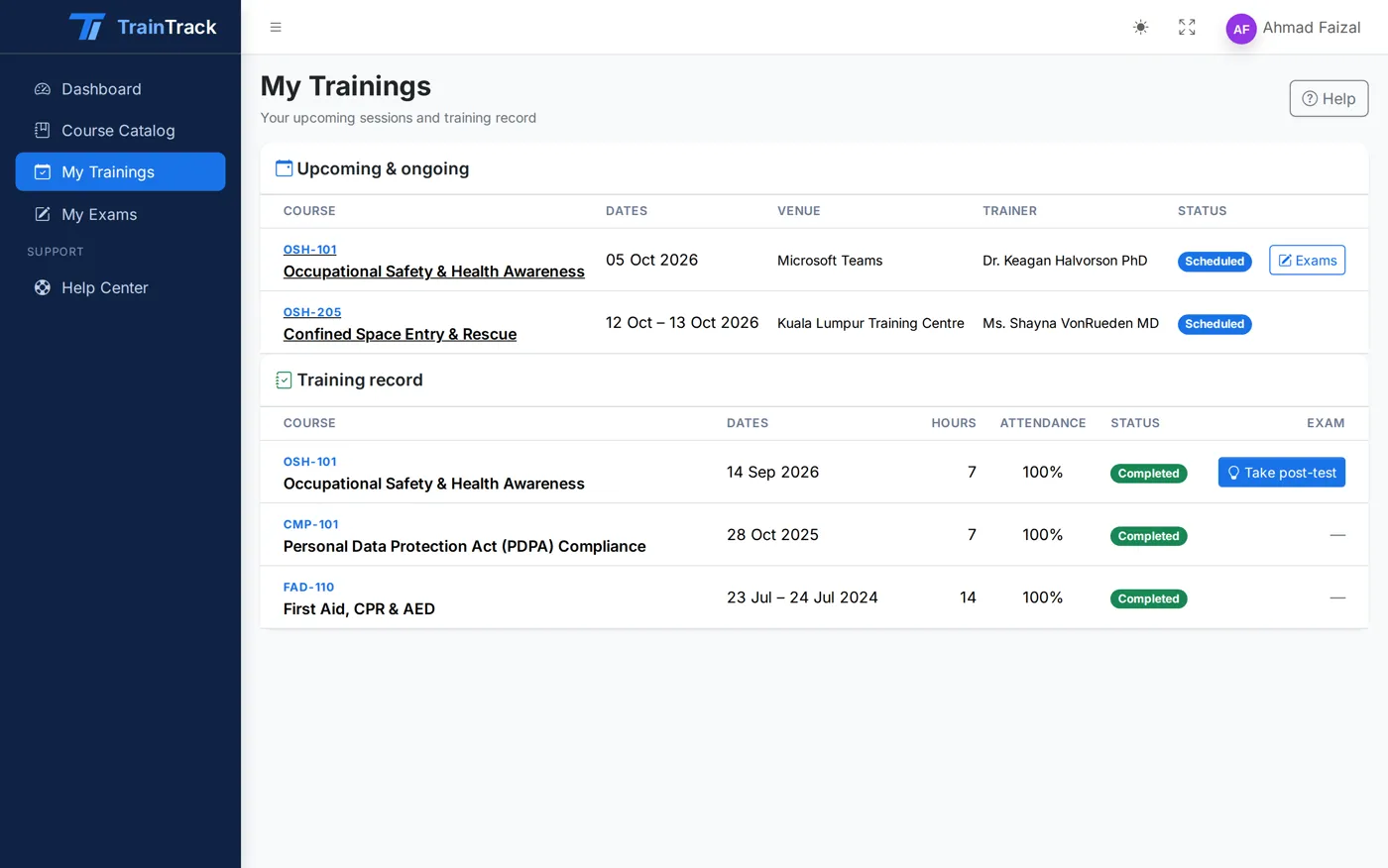
- My Trainings Upcoming and past sessions with dates, venue and status.
- Exams to take Suggested exams appear as soon as a training is completed.
- Mobile friendly Built for small screens, so staff on the shop floor can sit an exam from their phone.
Who it is for
Built for everyone involved in training.
Training providers
Run public and in-house courses for many client companies, with exams, attendance and HRDF paperwork handled in one place.
HR & L&D teams
Book staff into training, see who passed, and know which certifications are about to expire — before the auditor does.
Employees
See upcoming trainings, sit exams on any phone and get reminded when it is time to renew.
FAQ
Questions we are often asked.
What is TrainTrack?
TrainTrack is a training management system for training providers and the companies they serve. It covers the course catalog, session scheduling, enrollment, attendance, exams, certification expiry and reports — all in one place.
Who is it for?
Training providers who run courses for many client companies, and HR teams who need to keep track of their employees’ training, exam results and certifications.
Does it help with HRDF (HRD Corp) claims?
Yes. Courses can be marked HRDF-claimable with their scheme, sessions record the grant number, companies record their employer code, and attendance and exam reports export to CSV or a print-ready PDF for your claim file.
How does certification expiry work?
Give a course a recertification period, such as every 24 months. TrainTrack adds it to each employee’s last completion date and marks the certification Valid, Expiring (within 90 days by default) or Expired. HR sees a “Retraining due” alert and gets a daily summary email.
Can each company manage its own staff?
Yes. Company HR signs in to their own space, adds employees, enrolls them into sessions and runs reports. They only ever see their own company’s data.
What kind of exams can we run?
Multiple-choice pre-tests, post-tests and assessments with a pass mark, a number of attempts, an optional timer and shuffled questions. Grading is automatic.
Can trainees use it on their phone?
Yes. The trainee portal and exams work on any phone, tablet or computer.
Can our website show our course schedule?
Yes. TrainTrack publishes courses and upcoming sessions through a public feed. The Courses page on this website reads it live.
Can I try it first?
Yes. The live demo has three ready-made accounts — Administrator, Company HR and Trainee — with sample courses, sessions and exams.
Plan, track and stay compliant with TrainTrack.
See it with your own courses in a 30-minute walkthrough, or sign in to the live demo right now.